BLAT 和 UCSC 系列工具源码编译安装
在 https://hgdownload.cse.ucsc.edu/admin/exe/linux.x86_64/ 这个页面中,UCSC 官方已经提供了很多已经编译好可以直接在 Unix/Linux 直接使用的 UCSC Genome Browser 的 Utils 工具集。
但对于老旧的服务器,如 RHEL 6.X,这些编译好的工具可能会出现报错:
 因此,可以通过源码编译安装的方法来解决。
源码文件
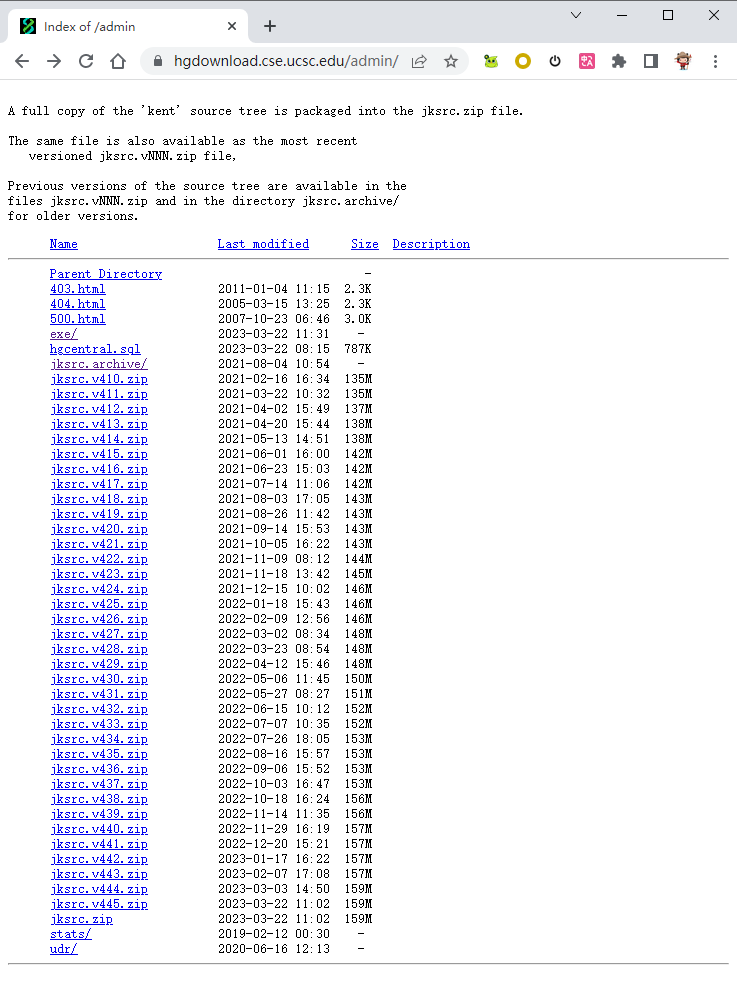
UCSC Genome Browser 工具集对应的源码放在 https://hgdownload.cse.ucsc.edu/admin/,对应于 jksrc.vNNN.zip 文件。
编译安装
编译安装可以参考 https://github.com/ucscGenomeBrowser/kent/blob/master/README 的说明。
个人在 RHEL 6.5 x86_64 服务器中编译 jksrc.v400,执行make utils一步无法最终成功(错误如下),但至少能在安装目录下得到一堆包括 blat/twoBitToFa/bigWigToWig 在内的可执行程序(虽然不是完全成功,但至少得到想要的程序)。
$ unzip jksrc.v400.zip
$ cd kent/src
$ vi inc/common.mk  ##设置 BINDIR = /home/shenweiyan/software/UCSCSuite
$ echo $MACHTYPE
x86_64-redhat-linux-gnu
$ export MACHTYPE=x86_64
x86_64
$ make
......
../../lib/x86_64/jkweb.a(windowsToAscii.o): In function `windowsToAscii':
/Bioinfo/SRC/build/kent/src/lib/windowsToAscii.c:13: undefined reference to `libiconv_open'
/Bioinfo/SRC/build/kent/src/lib/windowsToAscii.c:19: undefined reference to `libiconv'
collect2: ld returned 1 exit status
make[2]: *** [/home/shenweiyan/software/UCSCSuite/pslLiftSubrangeBlat] Error 1
make[2]: Leaving directory `/Bioinfo/SRC/build/kent/src/utils/pslLiftSubrangeBlat'
make[1]: *** [pslLiftSubrangeBlat.all] Error 2
make[1]: Leaving directory `/Bioinfo/SRC/build/kent/src/utils'
make: *** [utils] Error 2
- Software Requirements 参考:Manual installation of the UCSC Genome Browser on a Unix server
BLAT 安装
📢 参考:《Installing BLAT and BLAST》
It’s been a while since I last installed BLAT and when I went to the download directory at UCSC: http://users.soe.ucsc.edu/~kent/src/ I found that the latest blast is now version 35 and that the code to download was: blatSrc35.zip. However, you can also get pre-compiled binaries at: http://hgdownload.cse.ucsc.edu/admin/exe/ and that there was a linux x86_64 executable for my architecture available at: http://hgdownload.cse.ucsc.edu/admin/exe/linux.x86_64/blat/. Though YYMV, BLAT can be a little bit of a tricky beast to get going, so I decided to download the source code and compile that.
I will be compiling this code as ‘root’ as a system tool in/usr/local/src, so do not scream at me for that.
First I created an/usr/local/src/blatdirectory and I copied the blatSrc35.zip file into that.
Next I used
unzip blatSrc35.zip
to unpack the archive. This gives a directory blatSrc now move into that directory.
#cd blatSrc
before you begin read the README file that comes with the source code.
One thing about building blat is that you need to set the MACHTYPE variable so that the BLAT sources know what type of machine you are compiling the software on.
on most *nix machines, typing
echo $MACHTYPE
will return the machine architecture type.
On my CentOS 6 based system this gave:
x86_64-redhat-linux-gnu
However, what BLAT requires is the ‘short value’ (ie the first part of the MACHTYPE). To correct this, in the bash shell type (change this to the correct MACHTYPE for your system)
MACHTYPE=x86_64
export MACHTYPE
now running the command:
echo $MACHTYPE
should give the correct short form of the MACHTYPE:
x86_64
now create the directorylib/$MACHTYPEin the source tree. ie:
mkdir lib/$MACHTYPE
For my machine, lib/x86_64already existed, so I did not have to do this, but this is not the case for all architectures.
The BLAT code assumes that you are compiling BLAT as a non-privileged (ie non-root) user. As a result, you must create the directory for the executables to go into:
mkdir ~/bin/$MACHTYPE
If you are installing as a normal user, edit your.bashrcto add the following (change the x86_64 to be your MACHTYPE):
export PATH=~/bin/x86_64::$PATH
For me, though, this was not good enough. I wanted the executables in/usr/local/binwhere all my other code goes. As a result I did some hackery…
There is a master make template in the inc directory called common.mk and I edited this file with the command:
vi inc/common.mk
I replaced the line
BINDIR=${HOME}/bin/${MACHTYPE}
with
BINDIR=/usr/local/bin
saved and quit (as this is in my path, I do not need to do anything else)
All the preparation is now done and you can create the blat executables by going into the toplevel of the blat source tree (for me it was /usr/local/src/blat/blatSrc, but change to wherever you unpacked blat into).
Now simply run the command:
make
to compile the code.
Blat installed cleanly and the executables were all neatly placed in/usr/local/bin/x86_64, just like I wanted.
now simply running the command:
blat
on the command line gives me information on blat and sample usage.
Blat is installed and it’s installed properly in my system code tree!!!